
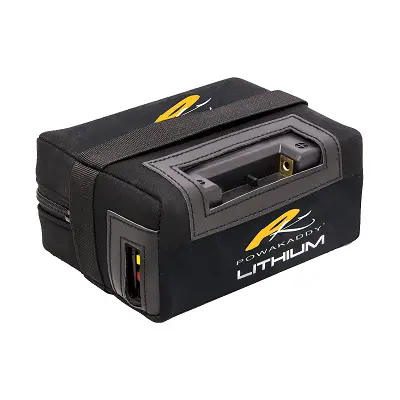
PowaKaddy lithium battery problems are among the most frequently searched concerns by golfers who depend on an electric caddy to walk 18 or 36 holes without fatigue. This guide provides a structured diagnostic and resolution framework for the most common faults reported across owner forums, manufacturer documentation, and authorized dealer channels, so that owners can identify symptoms, understand the underlying causes, and select the correct solution before contacting a service center.

Introduction
PowaKaddy, headquartered in Sittingbourne, Kent, England, has been a pioneer of the electric golf trolley since 1983 and currently markets itself as the world’s number one electric golf trolley brand, with more than one million sales across 50 countries. In the United States, PowaKaddy electric caddies such as the FX3, FX5, FX7, Compact CT6, CT8, and the RX1 GPS Remote have steadily grown in popularity among walking golfers who want to preserve their stamina without resorting to a riding cart. Central to that experience is the PowaKaddy lithium-ion battery, marketed under the Plug’n’Play™ branding, which has largely replaced the older sealed lead-acid (SLA) packs that once shipped with the brand’s Freeway (FW) range.
PowaKaddy’s modern lithium pack is a 30-volt nickel cobalt manganese (NCM) chemistry cell stack with an integrated Battery Management System (BMS) and a top-mounted on/off isolator switch. It is sold in three primary capacity variants: the Standard 18-hole pack at 220 Watt-hours (Wh), the Extended 36-hole pack at 260Wh, and the XL-Plus pack at 299Wh, designed primarily for the heavier RX-series remote-controlled trolleys. These packs interface with the trolley either through the proprietary Plug’n’Play recess (later FW, FX, CT, and RX models) or, on legacy models and many third-party trolleys, through a Torberry/Anderson-style connector or T-bar connector.
For United States golfers, understanding common problems and how to diagnose them matters for several reasons. First, PowaKaddy’s authorized service network is concentrated in the United Kingdom and Ireland, and the manufacturer’s warranty is administered primarily through that network; United States customers are typically supported through specialist dealers such as Motogolf.com (Las Vegas, Nevada) and Big Horn Golfer (Pittsburgh, Pennsylvania), with a 2-year trolley warranty and a 5-year pro-rated lithium battery warranty. Second, lithium battery faults can be expensive to replace (often $250 to $400 or more for a like-for-like Plug’n’Play pack) and yet many of the most frequently reported problems are recoverable with simple at-home diagnostics. Third, lithium-ion cells, when truly damaged, present a non-trivial fire hazard, so distinguishing between a recoverable fault and a damaged pack is a safety matter, not just a convenience matter.
This article surveys the major problem categories reported by consumers in golf forums and technical Q&A archives, cross-references them against PowaKaddy’s official charging and battery instructions, and provides a structured diagnostic and resolution framework. Each section is organized so that a United States owner of a PowaKaddy lithium battery can identify symptoms, understand causes, walk through troubleshooting steps, and select an appropriate solution, including knowing when to stop attempting a self-repair and approach an authorized dealer instead.
Battery Not Charging
A PowaKaddy battery not charging is the single most common complaint in lithium ownership, appearing repeatedly across Golf Monthly forums, Boards.ie, JustAnswer, and Trustpilot reviews. It is also the failure mode most likely to be misdiagnosed because the symptoms can be produced by either the battery, the charger, the connecting cables, or a user-induced fault.
Symptoms
- Charger indicator never illuminates, or the green “ready” light comes on within seconds of connecting a flat battery, falsely indicating a full charge.
- Charger indicator stays solid red or flickers between yellow/orange and green and never settles on a steady green.
- The battery will not power the trolley after a normal overnight charge.
- The charger’s red light is dim or barely visible while connected.
- Battery only charges to a fraction of its capacity (one Golf Monthly user reported the pack “all of a sudden… only charging a quarter”).
Causes
- Isolation switch in the OFF position. PowaKaddy’s modern Plug’n’Play lithium pack must have its top-mounted on/off (or “1/0”) isolator switch in the ON (1) position before the charger can communicate with the BMS. Multiple owners on a Boards.ie discussion thread have observed that “if red and green are flashing alternatively – there is a small button at the back which must be switched on to charge it.”
- Aged cells reaching end of life. Lithium NCM cells degrade roughly 2 to 3 percent per year of use; a JustAnswer expert noted that a 6-year-old Plug’n’Play battery will often fail abruptly after working “perfectly the day before,” because cell imbalance has finally tripped the BMS into a permanent protection state.
- Charger fault. PowaKaddy 30V chargers have two LEDs (red while charging, green when complete). A failed charger may show the wrong LED, may produce too low a voltage, or may not communicate with the BMS at all. One Golf Monthly user found their charger “had not changed to green and was flickering on yellow,” and replacing the charger restored normal operation.
- Charger incompatibility or substitution. The lithium pack and the older lead-acid pack share connector geometry on legacy Freeway models but require different chargers. Using a lead-acid charger on a lithium pack will either fail to charge it or, in worst cases, damage the BMS.
- Deep-discharge protection latched. If the pack has been left flat for months (for example through winter storage with the trolley turned on), the BMS may latch into a protection mode. Many JustAnswer and forum threads identify this latching behavior with alternating red/green flashing on the charger.
- Dirty or oxidized contacts. Grit on the T-bar or Plug’n’Play recess prevents the charger seeing the pack. A Golf Monthly thread on a flickering yellow charger light traced the fault to grit on the T-bar interface, not the charger itself.
- Internal BMS or cell-balancing fault. Where two chargers and a known-good battery have been swapped in and the symptom persists in the suspect pack only, the fault is almost always inside the pack (BMS or one weak cell group).
Troubleshooting Steps
- Confirm the isolator switch on the top of the pack is in position 1 (ON). For older first-generation Plug’n’Play packs, locate the small switch on the rear of the pack and ensure it is on.
- Inspect the wall socket and confirm it is live. Eliminate extension cords; PowaKaddy explicitly advises against them.
- Visually inspect the charger’s barrel plug and the corresponding jack on the battery for bent pins, debris, or corrosion. Wipe both contact surfaces with a dry, lint-free cloth.
- Connect the charger and observe the LED sequence. A discharged pack should show a steady red light, transitioning to green when full. A green light within 5 to 10 seconds of connection on a flat pack indicates either a fully charged pack, a charger that is not actually delivering current, or a BMS that has refused the charge.
- If a second known-good PowaKaddy charger of the same voltage is available, substitute it.
- If a known-good battery is available, plug it into your charger to determine whether the charger is the failed item.
- Use a multimeter on the battery’s output terminals (or via a T-bar/Torberry adaptor cable). A healthy 30V Plug’n’Play pack should read approximately 28 to 33.6 V depending on state of charge. A reading of 0 V or under 20 V usually indicates the BMS has cut off, often unrecoverable on aged packs.
- Leave the charger connected for 12 hours per the PowaKaddy charger instruction booklet. PowaKaddy explicitly states “if the green light does not show after charging for 12 hours, something is wrong.”
- Document the battery’s age and warranty status. PowaKaddy requires the pack to be registered within 30 days of purchase to qualify for the 5-year pro-rated warranty (otherwise a 2-year standard warranty applies).
Solutions
- Switch on, then re-charge. In a surprisingly large fraction of cases reported on Boards.ie, simply ensuring the isolator is in position 1 before connecting the charger restores normal charging.
- Replace the charger. PowaKaddy chargers (T-bar/Interconnect type or Plug’n’Play type) are available from authorized dealers and carry a minimum 12-month warranty when bought new.
- File a warranty claim. If the battery is under 24 months old (free replacement) or within years 3 to 5 (50%, 70%, or 85% discount, respectively, on the recommended retail price), contact your authorized United States dealer or PowaKaddy directly. The pro-rata schedule is documented in the International Product Warranty.
- Replace the battery. If the pack is over five years old and a multimeter shows zero or near-zero output that does not recover after a 12-hour charge attempt, the pack should be retired and recycled. As one JustAnswer expert observed, lithium batteries frequently fail unexpectedly after several years of use, even if they appeared to be in good condition just the day prior.
- Use only a PowaKaddy-compatible charger. Multiple forum users have damaged batteries with mismatched chargers; age-related degradation and charger incompatibility are the leading causes of unrecoverable charging faults.
Rapid Power Loss / Short Runtime
A pack that charges to a green LED but fails halfway around the course is an extremely common and frustrating problem, particularly as packs age past three years. The PowaKaddy FAQ is also strict on usage envelopes: the Standard 220Wh pack is rated for 18 holes only; the 260Wh Extended pack is rated for 36 holes; and trying to over-extend either invalidates the warranty.
Symptoms
- Trolley operates normally for the first several holes and then either slows progressively, cuts out under load (especially on uphill sections), or stops entirely.
- Voltage at rest is acceptable but collapses to under 20 V under load and recovers slightly when the trolley is rested.
- Battery indicator on the trolley handle drops abnormally fast.
- One forum user described this exactly on a Golf Monthly forum thread: “after about 4 holes or going uphill the trolley trips out and I have to take the battery out and turn the switch on the battery off then back on then trolley is ok until the next hill.”
- Trustpilot reviewers report packs “running out after 14/15 holes” or “running down before eighteen holes.”
Causes
- Cell imbalance and capacity fade. NCM cells lose capacity with cycle count; once a pack drops below approximately 70 percent of its rated capacity it cannot reliably complete 18 holes.
- Routine over-extension. Using a Standard 18-hole pack for 27 or 36 holes — explicitly described by PowaKaddy as a behavior that “may damage the overall capacity of the battery and may result in an early failure.”
- Insufficient recharging time between rounds. Playing two consecutive days without a full re-charge, particularly with the Extended pack, is a documented cause of premature capacity loss.
- Trolley mechanical drag. PowaKaddy’s FAQ explicitly identifies the “condition of trolley (a free-running trolley obviously demands less power)” as a determinant of effective runtime. A binding wheel or stiff axle causes the motor to draw excess current and trips the BMS.
- Heavy bag, hilly course, or wet conditions. PowaKaddy’s manual identifies “long or exceptionally hilly courses, wet ground conditions, and excessively heavy golf bags” as factors that may shorten runtime, even on a healthy pack.
- Dirty or high-resistance T-bar/Plug’n’Play contacts. A high-resistance contact behaves like a partial open circuit under load; the BMS sees the voltage sag, registers an over-current, and shuts off. The trolley appears to “trip” repeatedly.
- Faulty isolator/on-off switch. A user reported that an intermittent under-load cut-out was “the switch on the bottom of the battery! A known issue apparently and repair agents will not touch them as they are not allowed to open the casing.”
Troubleshooting Steps
- Verify trolley free-running condition. With the battery removed, push the trolley by hand on a flat surface. The wheels should rotate freely. If they do not, clean and lubricate the axle, check for compacted grass in the wheel hubs, and confirm the freewheel button on each wheel is fully engaged.
- Inspect and clean the battery’s positive and negative terminals (or T-bar contacts) with a clean, dry cloth and a small amount of contact cleaner.
- Weigh the bag. A typical United States carry/cart bag with a full set of clubs, balls, rain gear, and beverages can exceed 35 pounds; PowaKaddy is engineered with the assumption of a moderate load.
- Measure resting voltage with a multimeter immediately after a full charge. A healthy 30V Plug’n’Play pack should be near 33.6 V at rest. A pack that reads 32 V or less off the charger has very likely lost capacity.
- Conduct a controlled discharge test by running the trolley unloaded (upside down, wheels free) and timing the runtime. Compare with a known-good pack of equivalent capacity if available.
- If the cut-out happens only when the on/off button is pressed firmly, suspect the integral switch.
Solutions
- Match the pack to the round. Routine 27-hole or 36-hole rounds require an Extended pack, not a Standard pack. PowaKaddy explicitly recommends purchasing a second battery for golfers who play two rounds in one day.
- Recharge within 24 hours. PowaKaddy’s published advice is unambiguous: recharge after every round, regardless of holes played, ideally within 24 hours.
- Service the trolley. A noisy or stiff drivetrain steals capacity. PowaKaddy’s FAQ recommends having the trolley checked when battery performance declines.
- Replace the pack. If resting voltage is correct but runtime is half of nameplate after a full overnight charge, the cells have aged. United States owners within the 5-year pro-rata window can claim a partial credit on a replacement.
- Engage warranty support for switch faults. Because PowaKaddy explicitly forbids opening the sealed pack — a position confirmed by independent service agents — a confirmed integral switch fault almost always requires a replacement pack, not a repair.
Battery Not Turning On
Distinct from a non-charging battery, a non-starting battery is one that the charger has accepted (the green light comes on) but the trolley sees no power when the battery is mounted and the on/off button pressed.
Symptoms
- No LED illuminates on the battery’s top isolator switch.
- LED on the battery turns on but the trolley handle display is blank or shows no input.
- Display works but the trolley does not move when the speed control is engaged.
- A Trustpilot reviewer described the symptom precisely on a CT6: “Battery is on, display is on but when I push the yellow button, it does not move forward.”
- A delayed response to the on/off button, intermittently — clicks once and nothing happens, clicks again and the LED slowly comes up.
Causes
- Discharged pack despite a green charger LED. This often arises from a charger that has falsely indicated full charge — a common Golf Monthly forum complaint where the green light came on within seconds on a clearly flat pack.
- Auto power-off engaged. The current-generation Plug’n’Play battery includes an “auto power off function” that switches the pack off automatically after 10 hours of inactivity. Users unaware of this feature can mistake it for a fault.
- Faulty integral on/off switch or LED indicator. Multiple Trustpilot reviews describe failed switches on FX3, CT6, and CT8 trolleys; a Golf Monthly user noted a 5-year-old FW3i where the LED on the on/off button “shows green when pressed and switched on” had failed.
- BMS lock-out due to deep discharge or over-temperature. A pack stored in a hot garage in the summer or a cold garage in the winter may trigger BMS thermal protection.
- Loose Plug’n’Play seating or T-bar connection. If the battery has not seated fully in the trolley, the contacts do not bridge and the trolley cannot draw current.
- Trolley-side fault rather than battery-side. A blown handle PCB or a damaged motor controller can present as “no power” even though the battery is healthy. Cross-testing with another PowaKaddy battery isolates this.
Troubleshooting Steps
- Press the on/off button firmly and hold it for two seconds. Observe the LED. No LED at all suggests either the switch or the cells; a brief flicker followed by darkness suggests a tripped BMS.
- Remove and reseat the battery. With a Plug’n’Play pack, listen and feel for the latch click. With a T-bar pack, ensure the connector is fully home with no gap.
- Use a multimeter on the output terminals or via an adaptor cable. If voltage is present, the cells and BMS are intact and the fault is in the switch, the seating, or the trolley.
- If voltage is absent at the output but the pack reports having charged, suspect the BMS or switch.
- If a known-good battery operates the trolley normally, the suspect pack is at fault. Conversely, if the suspect pack operates a known-good trolley, the original trolley has a fault rather than the battery.
- Allow the pack to acclimate to room temperature for 30 minutes if it has been stored in a hot or cold environment.
Solutions
- Re-charge fully on a known-good charger. A flat pack masquerading as a charged pack is the most common false fault.
- Replace the integral switch via the manufacturer. Because the casing is sealed, a switch repair must be done by PowaKaddy or an authorized service agent. Several Trustpilot reviewers have confirmed that PowaKaddy will repair switch failures under the 5-year warranty: one CT6 owner reported their battery “was repaired very promptly under the 5 year warranty” two and a half years into ownership.
- For United States owners, contact a United States authorized dealer for warranty handling, as PowaKaddy’s primary repair facility is in the United Kingdom and shipping a battery internationally is restricted by lithium transport regulations.
- Do not attempt to open the case. PowaKaddy’s manual is explicit: “Do not open or tamper with a lithium battery.” The pack contains charged NCM cells that present a fire risk if shorted and the BMS provides safety functions that cannot be safely bypassed.
Flashing Lights & Error Codes
PowaKaddy lithium chargers and battery LED indicators communicate state-of-charge and fault conditions through a relatively simple LED scheme. Misreading these can lead a user to discard a recoverable battery or, conversely, to keep using a damaged one.
Symptoms
- Charger LEDs alternating red and green during charge.
- Charger LED flickering yellow rather than transitioning cleanly from red to green.
- Battery LED on the on/off switch flashing rather than steady.
- A representative thread on Boards.ie captured the alternating-LED scenario verbatim: “I plugged it back into the charge pack and the red and green lights are alternately flashing… It has been left on charge for the last two months which was probably a bad mistake on my behalf.”
Causes
- Battery damage or BMS protection lock. PowaKaddy’s official charger booklet lists three reasons the green light may not appear: “the battery was not turned on when connected to the charger; the charge cycle has finished and the battery has turned off; there may be a fault with the battery or charger.”
- Battery left switched off during charging. The Plug’n’Play pack must be in position 1 (ON) to be charged. As the Boards.ie respondent put it: “Some of those batteries have to be switched on before charging. On those ones, you can get the alternating lights if it is switched off when charging.”
- Battery left on charge or unused for too long. Lithium packs sustain damage when left at zero state of charge for extended periods; the BMS may lock the pack.
- Cell imbalance. A single weak cell group in an aged pack can cause the charger to enter and exit a balancing/bypass cycle, producing flickering LEDs.
- Poor contact at the charge port causing intermittent communication. This is the cause behind the flickering yellow charger LED that one Golf Monthly user resolved by cleaning the T-bar contacts.
Troubleshooting Steps
- Disconnect the charger. Switch the battery to position 1 (ON). Reconnect the charger. Observe whether the LED sequence normalizes.
- Cross-check the manual on the battery’s official product page or the official 30V battery instructions PDF.
- Try a different known-good charger if available.
- Inspect contact pins on both the charger and the battery for grit; clean with a dry cloth.
- Document the LED pattern (steady, slow flash, fast flash, alternating) and the time elapsed since plug-in. Provide this information when contacting support; it materially shortens diagnosis.
Solutions
- If turning the isolator on resolves the flashing, no further action is required.
- If the alternating red/green pattern persists after toggling the switch and trying a second charger, the BMS has locked the pack and PowaKaddy support should be contacted. The flashing pattern has been confirmed by multiple Trustpilot reviewers as a warranty trigger after the PowaKaddy agent confirmed the fault on the spot.
- Do not attempt to “force” charge a flashing pack. PowaKaddy and lithium safety documentation universally warn that a damaged pack should not be charged; place it in a non-combustible area outdoors and contact a recycling/disposal authority if damage is suspected.
Connector & Contact Problems
Connector and contact problems are often dismissed as trivial but are responsible for a disproportionate number of “battery dead” complaints. PowaKaddy uses three connector families across its history: the older T-bar connector (still used on many Freeway-era trolleys and on universal lithium packs), the Torberry/Anderson red-and-black connector (used on third-party batteries and many non-PowaKaddy trolleys), and the proprietary Plug’n’Play recess on FW, FX, CT, and RX models.
Symptoms
- Trolley loses power when going over bumpy ground or rough fairway.
- Trolley speed setting clicks back to zero whenever the user attempts to set it.
- Battery makes intermittent contact, working when pressed down by hand and failing otherwise.
- A representative complaint posted to a Golf Monthly battery thread reads: “When I connect battery the t-bar feels loose and no power, I tried my friends battery and it is a tight fit on t-bar and trolley works.”
- Another user reported that “the connection to the battery has become ‘looser’, to the extent that I need to fit a washer between the battery and the T-bar connector to take up the ‘slack’.”
Causes
- Worn T-bar contacts. Repeated insertion and removal of the battery causes the spring contacts in the T-bar to spread, reducing the contact pressure. This is particularly common on aftermarket lithium packs fitted into older Freeway frames.
- Aftermarket battery dimensional tolerance. Universal lithium packs often have slightly thinner T-bar geometry than PowaKaddy’s original lead-acid packs, contributing to the loose-fit problem.
- Corrosion. Although the lithium pack itself is sealed, corrosion of the trolley-side contacts is common in humid storage conditions and in coastal/marine environments such as Florida or coastal California.
- Grit, sand, or grass clippings. Grit lodged in the contact face acts as an insulator and can present as a flickering yellow charger LED traced back to a contaminated T-bar interface.
- Damaged battery lead or jack. On Torberry-equipped systems, the molded plastic housing can crack, and the spade contacts can pull free of their crimp.
- Polarity error after lead replacement. When a Torberry connector is rewired, reversing polarity can blow the trolley’s controller and handle PCB. Independent golf trolley repair specialists emphasize ensuring positive-to-positive (red) connection because reversing polarity destroys the controller and the handle PCB.
Troubleshooting Steps
- Inspect both the trolley-side T-bar/Plug’n’Play recess and the battery-side contacts. Look for visible discoloration, green or white corrosion, or compacted debris.
- Wiggle the battery in place with the trolley turned on. If the display flickers or the speed resets, the contact is intermittent.
- Measure trolley-side voltage at the connector with a known-good battery installed. A drop of more than approximately 0.3 V from battery output to trolley input under no load indicates contact resistance.
- Check the Torberry plug for cracks, crimp pull-out, or melted housing.
- On Plug’n’Play models, confirm the latch fully engages and the pack does not lift even when the bag is loaded.
Solutions
- Clean contacts. Use a dry, lint-free cloth, fine emery paper, or contact cleaner spray. Avoid water. A light spray of contact protectant after cleaning is recommended by independent golf trolley repair specialists.
- Replace worn connectors. Replacement T-bar and Torberry connector kits are available from specialist retailers, and a replacement Torberry connector kit including red and black housings and 30A spade contacts is typically inexpensive.
- Use an adaptor for mismatched batteries. PowaKaddy-original batteries can be used on Motocaddy-style Torberry trolleys (and vice versa) using T-bar-to-Torberry adaptor leads available from specialist suppliers.
- Address dimensional looseness. Some users have temporarily inserted a brass or stainless washer to take up slack on a worn T-bar; this is a field expedient rather than a permanent solution and should be replaced by a new connector.
- Re-verify polarity before re-energizing any rewired connector to avoid destroying the trolley electronics.
Internal Circuit / BMS Failures
The Battery Management System is the small electronic board inside every PowaKaddy lithium pack that monitors cell voltages, balances cells during charge, isolates the cells from over-current and over-temperature events, and switches the pack on and off via the integral isolator. When the BMS itself fails, no external diagnostic short of an output-terminal voltage check will reveal it, because the BMS is gating both charge and discharge.
Symptoms
- Battery accepts charge (charger LED transitions to green) but produces zero output voltage at the terminals.
- Battery worked fine the day before and is suddenly completely unresponsive.
- Battery powers the trolley for a few seconds and then permanently shuts off, requiring a full battery removal and switch cycle to reset.
- The on/off LED illuminates but no current flows.
- Charger lights alternate even after the isolator is in the ON position and a known-good charger is used.
Causes
- Age-related component failure. Capacitors, MOSFETs, and the microcontroller on the BMS PCB can fail at any time after roughly five years of use.
- Over-discharge protection latch. The BMS will lock out the pack if any cell voltage drops below approximately 2.5 V; on some BMS designs this lock is recoverable through a manufacturer reset, on others it is permanent.
- Cell-level fault that the BMS isolates. If one cell group has shorted internally or has lost contact (a cell tab weld failure, for example), the BMS will refuse to deliver power to protect the rest of the pack.
- Physical shock or moisture ingress. Even minor case damage from a dropped pack can disable the BMS. PowaKaddy’s FAQ states that any dropped or damaged battery is “normally fatal for a battery because the cells or circuit components inside may have been damaged. Exercise extreme caution in such a situation because the protection circuit module may have been disabled, thereby increasing the risk of fire.”
- Long storage at zero state of charge. Storing a flat pack for months irreversibly damages cells and can latch the BMS.
Troubleshooting Steps
- Confirm that all simpler causes (switch position, charger, contacts) are excluded.
- Measure terminal voltage with the isolator in both the OFF and ON positions. A pack that reads 0 V in ON and the manufacturer’s nominal voltage when OFF is unusual and almost always indicates a BMS output stage failure; more commonly both readings are 0 V.
- Look for any physical signs of damage: case cracks, swelling (a swollen pack must never be charged), corrosion at vents.
- Verify that the pack has not been stored connected to a switched-off mains outlet (a leading cause of deep-discharge BMS lock).
Solutions
- Replace the pack. PowaKaddy explicitly states that lithium batteries cannot be repaired and must not be opened. The JustAnswer expert assessment is unambiguous: where another battery works in the same trolley but the suspect pack does not, the fault almost certainly lies in the internal circuitry of the battery.
- Engage the warranty. Within the first 24 months of registered ownership, the replacement is free of charge in the United States dealer network. Years 3 through 5 carry a pro-rated discount.
- Recycle the failed pack responsibly. Lithium batteries should not enter household trash; United States owners should take the pack to a qualifying battery recycling drop-off through the Call2Recycle drop-off locator, which lists thousands of collection sites at retailers including Home Depot, Lowe’s, Best Buy, and Batteries Plus. PowaKaddy’s instruction is to dispose at your local recycling center.
- Treat suspected fire-risk packs with caution. If the pack is swollen, has been submerged, or has been mechanically damaged, place it outdoors in a non-combustible container, away from flammable materials, and contact a hazardous-waste service rather than recycling drop-off.
Maintenance-Related Failures
A substantial proportion of warranty claims trace not to manufacturing defects but to maintenance errors, particularly during the off-season. United States golfers in regions with a defined winter (Northeast, Midwest, Mountain) are particularly vulnerable.
Symptoms
- Battery that worked at the end of one season fails to charge at the start of the next.
- Pack that visibly worked through a few rounds in spring suddenly drops to half-runtime by mid-season.
- Charger LED falsely indicates fully charged on a flat pack after winter storage.
- Connectors corroded after storage in a humid garage.
- One owner summarized the typical winter-storage failure as having left the battery on charge for the last two months, and noting that “the research I am seeing indicates that I may have inadvertently damaged the battery by leaving it plugged in on charge too long.”
Causes
- Excessive trickle charging. Although PowaKaddy’s older instruction sheet stated it was safe to leave the battery plugged in on charge, the company’s current website advises disconnecting once green; older instructions and current website guidance directly conflict, and several forum users have noted this discrepancy.
- Discharged storage. Storing a pack at low state of charge accelerates self-discharge and can cause cell voltage to fall below the BMS’s recoverable threshold.
- Temperature extremes. Lithium-ion cells degrade rapidly above 40 °C (105 °F) and can be damaged by storage below −10 °C (14 °F). Garages in Phoenix and unheated sheds in Minnesota each present hazards.
- Failure to recharge promptly. PowaKaddy’s instruction is to recharge within 24 hours of every round, regardless of holes played.
- Use of unapproved chargers. Repeated use of a near-compatible aftermarket charger can degrade the BMS over many cycles.
- Failure to maintain trolley. A binding wheel or noisy gearbox shortens battery life over time and can be misdiagnosed as a battery problem.
Troubleshooting Steps
- Audit your storage practice against the official guidance: fully charge before storage, disconnect from the charger once green, store at room temperature in a dry place, and re-charge for a few hours every two months at minimum (more frequently for older packs).
- Inspect connectors for corrosion if storage was humid; clean as described in the Connector & Contact Problems section.
- Confirm the trolley is mechanically free-running; service the wheels and bearings annually.
- Confirm that you are using only the supplied PowaKaddy charger or an authorized replacement.
Solutions
- Adopt a written maintenance routine. See the Preventive Maintenance section below.
- Re-charge any pack that has been stored more than 30 days. PowaKaddy states the battery should never be left for “longer than two months without recharging for a few hours.”
- Service the trolley annually. A pre-season service from an authorized dealer typically includes wheel bearing inspection, motor brush check (where applicable), gearbox lubrication, and a battery health test.
- Replace consumables proactively. Worn T-bar/Torberry connectors, scratched chargers, and degraded power buttons should be replaced before they cause a battery to fail in service.
Model-Year and Variant Differences
Problem prevalence varies meaningfully across the PowaKaddy lithium lineup, and United States owners may have any of several generations on hand depending on when and where the trolley was purchased.
Universal Lithium (T-bar/Torberry, first-generation lithium retrofits). Sold from approximately 2014 onward as a drop-in replacement for the older lead-acid pack on Freeway-era trolleys. These are the packs most often associated with loose T-bar fit complaints, because the casing dimensions differ subtly from the original lead-acid block. Warranty was originally 2 to 3 years and was later extended; secondhand units rarely retain warranty protection because the warranty is non-transferable.
First-generation Plug’n’Play (introduced approximately 2015 to 2016). Used on FW3, FW5, FW7, and Compact trolleys. These packs are physically larger than the current generation and use a side-mounted on/off switch. Common complaints include integral switch failures (multiple Trustpilot reviewers) and capacity loss after 4 to 5 years.
Second-generation Plug’n’Play 30V (current; introduced with the FX and CT ranges). PowaKaddy describes this generation as “40% smaller than the previous model, while maintaining 100% of its capacity.” The on/off switch moved to the top of the pack with an LED indicator. The auto power-off function, which switches the pack off after 10 hours of inactivity, was added on this generation. Reported failure modes have shifted slightly: the integral switch issue has not been eliminated (one CT8 owner reported a sticky on/off switch on a one-year-old pack), but the looser T-bar problem has effectively disappeared because no T-bar is used.
Capacity variants:
- Standard 220Wh (18-hole). Nominal voltage 29.6 V, weight 1.56 kg, NCM construction. Most prone to short-runtime complaints when used over 18 holes by the user; the runtime reserve is small.
- Extended 260Wh (36-hole). Nominal voltage 29.6 V, weight 1.85 kg. Best balance of weight and capacity for most United States walking golfers.
- XL-Plus 299Wh. Designed primarily for the RX1 GPS Remote and similar remote-control models, where the larger draw of the steering motors reduces effective range; treated as an 18-hole pack on RX trolleys, but capable of 36 holes on lighter manual models.
The five-year pro-rata warranty applies across all current Plug’n’Play variants; the older Universal Lithium pack received only the two-to-three-year coverage when new.
Technical Context: How the Components Fail
Understanding the components helps a United States owner triage a problem before contacting a dealer.
Lithium-ion NCM cells. PowaKaddy uses nickel-cobalt-manganese chemistry, chosen for its high energy density (allowing the 1.56 to 1.95 kg pack weights typical of the line). NCM cells age primarily by capacity fade (loss of total stored energy per cycle) and by impedance growth (loss of ability to deliver high current). Capacity fade manifests as short runtime; impedance growth manifests as voltage sag and trolley cut-out under load.
Battery Management System (BMS). The BMS performs cell balancing during charge, voltage and current monitoring during discharge, temperature monitoring, and isolation when any parameter is out of envelope. PowaKaddy’s BMS also handles the auto-off function, the LED state indication, and the charger handshake. A BMS that latches into protection mode without a manufacturer-level reset will not be recoverable by a consumer.
Charger. PowaKaddy’s 30V Class 2 charger is a constant-current, constant-voltage device (CC/CV) that interfaces with the BMS. The two-LED scheme (red while charging, green when complete) reflects BMS status, not just an internal timer. A charger that “does not change color” is sometimes the charger and sometimes the BMS refusing to confirm full charge.
Plug’n’Play interface. Sprung pin contacts inside a plastic recess; weakness lies in mechanical fatigue, in grit ingress, and in the locking latch.
T-bar/Torberry connectors. Spring-loaded spade contacts inside a polymer housing. The Torberry connector is universal in the sense that there is no male/female distinction (a single housing mates with itself), and it is rated to roughly 30 A. Common failure modes: cracked housings, pulled-out crimps, and loosened spring tension after thousands of insertion cycles.
Integral on/off switch and LED module. A momentary push switch with an integrated indicator LED, soldered to the BMS PCB. Because the case is sealed and PowaKaddy forbids opening, a failed switch typically means a replacement pack rather than a $5 part swap.
Preventive Maintenance and Recommended Servicing
PowaKaddy publishes detailed care instructions for its lithium batteries in two locations: the official FAQ and Technical page and the charger instruction PDF. The following routine consolidates that guidance with the field experience of forum users and dealers.
Charging discipline.
- Charge after every round, regardless of holes played, ideally within 24 hours.
- Charge on a hard, flat, heat-resistant, non-carpeted surface; the charger gets hot enough to mark furniture or carpet.
- Do not use an extension cord. Plug the charger directly into a wall outlet.
- Confirm the isolator switch is in position 1 (ON) before connecting the charger to a Plug’n’Play pack.
- Allow up to 12 hours for the green light to appear; if it has not appeared after 12 hours, do not continue charging — investigate.
- Once the green LED is on, current best practice (and PowaKaddy’s website guidance) is to disconnect the charger; older printed manuals stating that it is safe to leave the pack on indefinite charge are out of date and conflict with the current website. When in doubt, disconnect.
- Never leave a charger connected to a battery with the mains switch off; this will slowly drain the pack.
Storage.
- Store fully charged at room temperature, in a dry place.
- Avoid storage temperatures below 10 °C (50 °F) for prolonged periods, and never below −10 °C (14 °F). Avoid temperatures above 40 °C (105 °F).
- Re-charge for a few hours at least every two months during long layoffs, and ideally monthly.
- Keep the isolator in the OFF (0) position during transportation; the auto-off function provides a backup but should not be relied on.
- Do not transport a lithium pack on a commercial flight without first confirming with the airline; many airlines refuse golf trolley batteries above 100 Wh in checked luggage.
Connector and contact maintenance.
- After every round, wipe the trolley-side recess and the battery-side contacts with a dry cloth.
- Periodically (every 10 to 20 rounds) clean contact faces with contact cleaner spray; allow to dry before reconnecting.
- Inspect Torberry/T-bar housings monthly for cracks or melted plastic.
- Avoid splashing water on the pack; PowaKaddy’s manual states explicitly that the pack must not be immersed and that a submerged pack is a fire hazard.
Trolley servicing.
- Annually, have the trolley itself serviced by an authorized dealer. A binding wheel halves effective battery life.
- Quarterly, push the trolley by hand on flat ground (battery off) and listen for unusual noise or drag.
- Inspect freewheel buttons on each wheel; engage and disengage to confirm function.
Warranty registration.
- Register every new lithium pack within 30 days of purchase to qualify for the 5-year pro-rated warranty. Unregistered packs default to the 2-year base warranty.
- Retain proof of purchase. United States customers should keep dealer receipts from authorized resellers accessible for any future claim.
Warranty and Service Considerations for United States Golfers
PowaKaddy’s manufacturing and authorized repair facility is located in Sittingbourne, Kent, United Kingdom. For United States customers, the practical warranty path runs through the United States distributor where the trolley was purchased. The two leading United States dealers, Motogolf.com (Las Vegas, Nevada) and Big Horn Golfer (Pittsburgh, Pennsylvania), administer the same five-year pro-rata battery warranty as the international scheme:
- Year 1 to 24 months: free replacement for manufacturing defects.
- Year 3: 50% discount on retail price for replacement.
- Year 4: 30% discount on retail price.
- Year 5: 15% discount on retail price.
Warranty registration must be completed within 30 days of purchase. The warranty is non-transferable. The warranty does not cover damage from accidents, misuse, or commercial use, and only applies to purchases made in the continental United States from authorized dealers.
International shipment of failed lithium batteries between the United States and the United Kingdom is restricted by hazardous materials regulations; United States dealers therefore typically diagnose, replace, or recycle the pack domestically rather than returning it to the United Kingdom. Customers should confirm with the dealer in advance whether shipping costs for a returned battery will be borne by the customer or the dealer.
Closing Recommendations
The PowaKaddy lithium battery is, by both manufacturer claim and field experience, capable of five or more years of reliable service when treated within its design envelope. The most common failure modes — failure to charge, short runtime, no-power-on-trolley, flashing-LED faults, connector intermittents, and BMS lock-outs — are heavily concentrated in three behavioral causes: an isolator switch left off during charging, prolonged storage at low or zero state of charge, and use of incompatible chargers or worn connectors. A disciplined charging and storage routine, supplemented by annual mechanical service of the trolley and prompt warranty registration, eliminates most of the problems documented in PowaKaddy forums.
When troubleshooting, the recommended order of operations for a United States owner is: confirm the isolator position, confirm the charger is functional with a known-good battery (or vice versa), inspect and clean the contacts, allow a 12-hour charge, and only then escalate to a dealer. If a battery is swollen, dropped, or submerged, it should be retired immediately to a qualified recycler rather than charged or used.